Key takeaways
- Amazon ECS offers three compute options: AWS Fargate, Amazon ECS Managed Instances and self-managed EC2 instances.
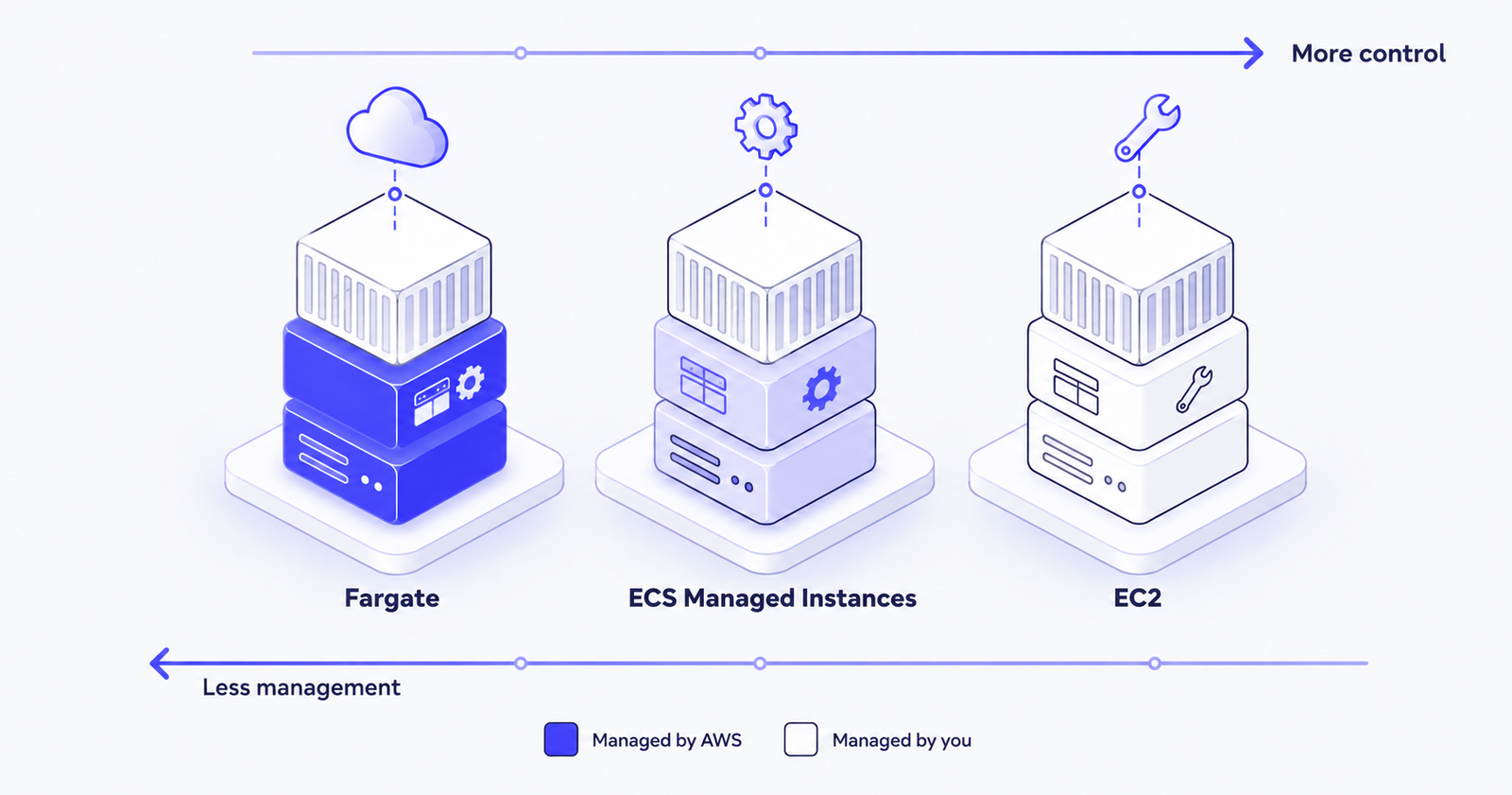
- With Fargate, AWS runs the compute for each task, so you have no servers to patch or scale, but you have less control over the host.
- With ECS Managed Instances, AWS provisions, patches and scales EC2 instances in your account, while you still choose the instance types.
- With self-managed EC2, you get full control over the host, but scaling, patching and capacity planning are your responsibility.
- One ECS cluster can mix all three options, so you can match each service to the compute it needs.
One container, three possible homes
Your application is packaged as a container and Amazon ECS is ready to run it. Before you deploy, ECS asks one important question: where should this container run?
For years the answer was a simple choice between Fargate and EC2. AWS has since added a third option, ECS Managed Instances, which sits between the two.
The real decision is not about which option is "best". It's about how much of the underlying server your team wants to own.
Option 1: AWS Fargate, where you never see a server
With Fargate, you define the CPU and memory each task needs, and AWS provides and manages the compute behind it. There are no instances to launch, patch or scale.
Why teams choose it:
- No operating system patching, AMI updates or cluster capacity planning
- Each task runs in its own isolated compute environment
- Scaling is done per task, so there is no spare server capacity sitting idle
- It's the fastest way to get a containerised service into production
Trade-offs:
- No access to the underlying host
- No GPU support
- No privileged containers or daemon tasks, such as host-level monitoring agents
- A higher price per unit of compute than well-used EC2 instances
Best for: web applications, APIs, microservices, scheduled jobs, and teams that want to focus on code rather than servers.
Option 2: ECS Managed Instances, real servers without the server work
ECS Managed Instances runs your tasks on actual EC2 instances in your AWS account, but AWS handles provisioning, patching and scaling for you. You describe the instance requirements, such as instance family or GPU type, and ECS selects and manages the instances.
Unlike Fargate, ECS can place several tasks on one larger instance, which can improve how well the capacity is used.
Why teams choose it:
- Access to specific EC2 instance types, including GPU and other accelerated instances
- No AMI management or patching work
- Support for On-Demand, Spot and Capacity Reservation instances
- More control than Fargate, with much less effort than self-managed EC2
Trade-offs:
- Less low-level host customisation than self-managed EC2
- A newer option, so check that it supports your Regions and features before you commit
Best for: GPU and machine learning workloads, applications that need particular instance types, and teams outgrowing Fargate's limits who don't want to manage servers.
Option 3: Self-managed EC2, full control and full responsibility
With the EC2 launch type, you run your own EC2 instances, usually in an Auto Scaling group connected to ECS through a capacity provider.
Why teams choose it:
- Full control over instance types, AMIs, kernel settings and host software
- Support for daemon tasks, privileged containers and custom agents
- The most flexibility for cost optimisation with Reserved Instances, Savings Plans, Spot and Graviton instances
Trade-offs:
- You patch the operating system and update the AMIs
- You plan capacity and configure scaling
- Poorly used instances waste money
Best for: large, steady workloads; strict compliance or host-level requirements; and teams with strong operations experience.
Side-by-side comparison
Who manages the servers?
- Fargate: AWS, and you never see them
- Managed Instances: AWS, with the instances in your account
- EC2: you
How much host control do you get?
- Fargate: minimal
- Managed Instances: moderate (you choose the instance types)
- EC2: full
How much operational effort is involved?
- Fargate: lowest
- Managed Instances: low
- EC2: highest
Can you run GPU workloads?
- Fargate: no
- Managed Instances: yes
- EC2: yes
How are you billed?
- Fargate: for the vCPU and memory your tasks request
- Managed Instances: based on the EC2 instances it runs (check the ECS pricing page for details)
- EC2: for the instances you run, whether they are full or not
The cost question, answered honestly
A common belief is that "Fargate is expensive and EC2 is cheap". The real answer depends on how well you use your servers.
- Fargate costs more per unit of compute, but you never pay for empty capacity. For small, spiky or unpredictable workloads, it is often the cheaper option overall.
- EC2 can cost less per unit, especially with Spot, Savings Plans or Graviton. That saving only appears if your instances are kept well used.
- Fargate has discounts too. Fargate Spot suits interruption-tolerant tasks, and Compute Savings Plans also cover Fargate usage.
Don't forget the hidden cost of engineering time. Patching, AMI updates and capacity planning take hours every month, and Managed Instances and Fargate remove most of that work.
How to choose in five questions
- Do you need GPUs or specific instance types? Choose Managed Instances or EC2.
- Do you need daemon tasks, privileged containers or host-level agents? Choose EC2.
- Is your team small, or is operations work a burden? Start with Fargate.
- Is your traffic spiky, or idle for long periods? Fargate avoids paying for empty servers.
- Is the workload large, steady and cost-sensitive? Well-used EC2 with commitment discounts may cost the least.
You can mix all three
You don't have to choose just one. With capacity provider strategies, a single ECS cluster can run some services on Fargate, others on Managed Instances and others on EC2.
A practical pattern is:
- Fargate for most web services and APIs
- Fargate Spot for interruption-tolerant background jobs
- Managed Instances for GPU workloads
- EC2 only where you truly need full host control
The same thinking applies to Amazon EKS, which can also run Kubernetes pods on Fargate or on EC2 nodes.
Conclusion
Fargate, ECS Managed Instances and EC2 aren't competitors. They're three levels of the same trade-off between convenience and control. Start with the least infrastructure you need to manage, and move to more control only when a real requirement, such as GPUs, host access or cost at scale, demands it.
Need help choosing or optimising your Amazon ECS setup? The Pentafox Cloud team helps businesses design, migrate and cost-optimise container workloads on AWS. Get in touch for an ECS architecture review.